
Today our trusty and heroic ICT technician installed gigabit Ethernet switches across the school, whilst our patient and long-suffering teachers put up with occasional blips in network connectivity. And the result? Faster than fast: remote desktop becomes a dream, gigabytes of files copy in minutes, generally the network plays nicely. The only issue is that our ageing .local server doesn’t have a gigabit Ethernet card. Ho hum!
Category: Hello world!
iTunes App Licences

Just been having a (thrilling) read through the iTunes Terms & Conditions to clarify a few things about purchasing iPad apps for multiple iPads. Do you need one Apple ID for each iPad? Or can you use a sync & charge device to copy your purchased apps onto 16 other iPads?
Here are some suggestions I’ve had:
- You can have up to 5 iPads attached to one Apple ID, so you’ll only need to buy apps for a fifth of your iPads.
- Set up one master Apple ID, load it up with iTunes gift vouchers and then gift all the apps to Gmail accounts you have made for each of your iPads. That way you’ll be licensed, but don’t have to set up an Apple ID for each iPad.
The only problem with these is that it doesn’t reflect the iTunes Terms & Conditions!
1. With serial users on one iPad, you must have one Apple ID per iPad

It’s a bit of a pain, and I wish that Apple would hurry up with their Volume Purchase Program to make this easier. But even with that, if you buy 45 copies of ‘Pages’, you still get 45 app codes that need to be redeemed on the 45 Apple IDs on your 45 iPads. The process might be easier but it still assumes one Apple ID per iPad for serial users.
2. You can’t use an iTunes gift voucher balance to gift apps

In order to gift apps to a multitude of iPad email addresses, you’d need to to set up the school credit card on one of the Apple IDs (with a hefty credit limit… 45x£50=£2250). Or just buy gift vouchers for each iPad.
Now, all of this is me talking from no experience whatsoever! I’d love to hear what other people are doing out there when it comes to managing multiple iPads.
Gripcase
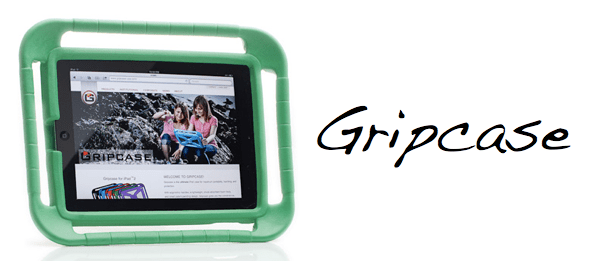
Wondering how to best protect some iPads when deploying them in a Foundation Stage of a school? That is indeed my query. These cases from Gripcase seem pretty cool as they allow you to basically drop the iPad on the floor without damage. That should do the trick!
This video explains and demonstrates it well…
Updating them there website
Today I had the easy task of showing some of the wonderful school office staff how to update the school website. It’s pretty straightforward, but compared to using the deeply awful web tool of a certain Scandinavian MLE, it’s a delightful walk in the park.
New school website!
Our school’s new website is now live – hurrah! I’m pretty impressed with how it’s turned out, mainly due to the elegant and powerful wonder that is WordPress. It hopefully should be easy to update as well, particularly once I’ve shown the senior leaders how to add posts and edit pages.
For those who know which school I go to, the website is www…sch.uk. For those who don’t, post me a comment and I’ll email you the link!
LGfL at the Mermaid (pt.III)

The last session of the LGfL conference was an update about the LGfL 2.0 migration. Basically, it’s a big job and it’s taking longer than we expected but will result in a faster, more secure and more resilient broadband connection for schools. Yay! One guy even tried enlivening his presentation by including Disney quotes. Fair dos.
The final 10 minutes or so was a very short presentation from Roger Larsen, the founder of Fronter. He gave a blistering tour of the history of education, starting with the Gutenberg press, through the Enlightenment and Industrial Revolution to the computer revolution of the last 30 years. It was a bit similar to the metanarrative I heard at the Apple European Summit, only without mention of who invented all those computers. The contrast between the classroom of 100 years ago and today was also mentioned, albeit uncritical of the seeming lack of real change because we now have the data projector screen which lets you view your MLE (i.e. Fronter). Hmmm!
So, what did I make of the conference? I guess, because LGfL fundamentally is a broadband provider, the unspoken emphasis was on all the wonderful educational things you can do with the Internet. Conversely, the paradigm shift that the iPad is causing was hardly mentioned at all, maybe just in passing. A web browser is all well and good, but the interesting things are happening when you combine native software and web services (i.e. iOS).
However, LGfL (with Virgin Media and Atomwide) are doing a super job of providing broadband+services for schools in London and it was certainly interesting to hear more about that.
And I got a free mug.
LGfL at the Mermaid (pt.II)
Here’s some of the other things I heard today…
Best Value Technology
Helpful insights from Paul Shoesmith on how to make the most of your money and ICT resources in schools. Some of his suggestions:
- Use what’s in your cupboards already. That USB webcam could also make a cheap visualiser!
- Think about your total cost of ownership before buying. Cheaper upfront may not be in the long term, i.e. cheaper printer but expensive toner.
- Paper. Huge amounts of money is wasted on printing that is unnecessary. In what ways could schools go paperless and save money?
‘Leading Creatively Costs Nothing’
The CEO of the Pearson Group came and talked about the importance of creativity. It was quite inspiring really, although trickier to put into practice due to the limitations and structures of our current schooling system. I loved her accounts of how six-year-olds might finish well-known sayings. For example: Strike while the…bug’s near. Don’t bite the hand…that’s dirty. A penny saved…is not much.
Anyway. Stuck for creativity? Go for a walk. Put things aside. Make links between unlikely concepts. Ask “What can go right?” when calculating risks.
LGfL Content Highlights
Showcasing new content on LGfL, such as Royal Mews and Romans in London. Not bad!
E-safety 360 Scheme
Ken Corish from South West Grid for Learning talked about a school self-assessment for e-safety called 360 degree safe. It seems pretty thorough and can result in an official ‘E-safety Mark’ for your school as well.
Fronter Updates
This was quite interesting, with lots of information about where Fronter is headed. They seem to be making it more attractive to look at and easier to use. Good news indeed!
More to follow…
LGfL at the Mermaid (pt.I)

On this remarkably sunny and pleasant morning I travelled to the Mermaid conference centre near Blackfriars station for the LGfL Schools Conference. It’s been interesting so far, and I’ll try and post throughout the day.
After some refreshments in a bar areas overlooking the Thames, the conference kicked off with a welcome from Brian Durrant, the CEO of LGfL. He’s a good guy, and was helpful when I had to email him to try and sort out our LGfL 2.0 fiasco. There was then a brief video welcome from Sir Richard Branson himself, as Virgin Media now provide all of the broadband for schools across London.
Niel McLean was the first keynote speaker proper, talking about ‘What next for online education’. Niel helped put together the original ICT curriculum in the UK and had lots of interesting things to say. I was particularly struck by his thoughts on the 5 basic competences in ICT (awareness, user, maker, evaluator, holistic) and we hopefully will be using them to think about reshaping our ICT curriculum over the next term. He also talked about the way that technology gets adopted in schools and that it has to reach a certain point for it to begin to give a return on the financial investment. For technology to really make a difference, the whole system needs to be redesigned in order to enable really innovate use of ICT.
The first seminar was done by a guy called Mike Briscoe, all about ‘Critical Leadership Decisions’. He outlined 9 different areas that need thinking about (direction, new technologies, future living, e-safety, teaching & learning, value for money, data, provision, beyond school) and posed us lots of questions. One thing I found fascinating was the off-the-cuff comment that most schools are now considering deploying iPads/tablet computers. This is pretty mind-blowing, considering that the iPad was only released a mere 2 years ago. The question is, what are the impacts for teaching & learning for things like iPads (apart from motivation)? Hmm…
Anyway, best listen to the seminar I’m in about ‘Best Value Technology’…
iPad Smart Covers in Schools
I was wondering if anyone out there has had experience of…
- Using Apple’s ‘smart covers’ for the iPad. Any good?
- Finding a good case to use with iPads in a school setting?
- Both of the above?
Answers on a postcard. Or just in the comment box below. Either is fine. Thanks!
LGfL Conference
It’s the LGfL conference on Monday, somewhere in central London. I’ve never been before but I hope it’s going to be a useful time, hearing where things are going for the whole London network. There’s even going to be a video presentation from Sir Richard Branson himself, as Virgin Media now provide the infrastructure for the new LGfL 2.0 connection.
One seminar I’m particularly interested in is about ‘Best Value Technology’. I’m pretty sure they won’t be saying to go out and kit your school out with Macs (much as I would recommend it!). But I wonder it they will mention the price-disruptive iPad (no doubt they won’t, to avoid being too ‘Apple-focused’). One would be hard-pressed to find a £270 laptop that is worth even turning on, let alone one that is pushing the boundaries of technology.
They are also addressing the question of ‘Where next for online learning?’. My hope is that online learning escapes from the arbitrary and frustrating limits of the web browser. We use 2Simple’s Purple Mash, which is in many ways great and quite remarkable considering it’s all just done in Flash in a browser. But it would be incomparably better if it was a native ‘app’, making use of web content and interactivity where appropriate, but also harnessing the power of the operating system to print and save stuff properly. It’s just too easy to accidentally close a web browser and lose everything. A gazillion iOS apps and counting may be trying to tell us something…
 Primary ICT