
Whilst at the South London Apple Education Summit, I discovered an app called Reflection, which allows you to mirror your iPad screen, wirelessly over wifi, to the screen of a Mac. It’s about $15, which is substantially cheaper than AppleTV+cables/adaptors (not that they’re truly expensive). I’ve had a try with it using the free trial, and it seems to work a treat! Hurrah!
Tag: iPad
UK Primary school is Apple Hot News
Check out this really cool UK Primary School on Apple’s website! It’s called Flitch Green and they’ve gone all out with Apple kit. I’m hoping my school will someday be a bit like this!
Hypothetically Managing iPads
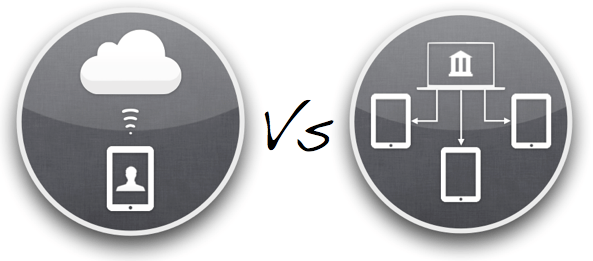
Here’s the scenario: say my school, instead of buying a couple of class sets of iPads, rather wanted to spread the iPad love and goodness around the school a bit more by giving class sets of 6 to certain year group and a sprinkling of iPads in the Foundation Stage. What would be the best way of managing them? The areas that need managing are as follows:
- initial setup – registering devices, giving the names etc.
- locking down certain features (app deletion, other parental controls)
- initial purchasing and installation of apps – making sure that they are properly licensed
- ongoing updating of apps and iOS
- further installation of apps, as required
- email address for each iPad –setup and creation
- general ease and manageability of any of the above tasks that teachers would then have to do
- backing up of documents and data
- access to the school’s shared drives
There seems to be two main approaches out there and two pieces of technology that are helpful. I’ll start with the technology.
Profile Manager on Lion Server
This rather natty set of server tools seems to allow you (from what I have figured out from reading the Interweb) to do the following:
- track the devices on your network
- restrict and manage certain settings on iPads
- remotely setup things like email on iPads
- install free apps over the air (apparently – not so sure about this one)
It’s all done through pushing, via Apple’s Push Notification servers, little XML files with configuration information. See, no wires!
We have a Snow Leopard Server and are upgrading to Lion server in the next month, so this is a no-brainer to use for ongoing management of iPads.
Apple Configurator
This is a Lion-only app that lets you setup, supervise and assign to users any iOS device. It’s a wired solution, requiring a USB connection, but lets you connect up to 30 devices at once. This looks like it will be very useful for the initial setup of an iPad as you can restore from a backup, set certain text on the lock screen, enrol a device to Lion Server and other fun things. This will definitely be useful too.
Managing the iPads
The management of the iPads then boils down to the question of Apple IDs. Will we have one Apple ID that is shared across all the iPads through a wired syncing solution via iTunes? Or will each iPad have its own Apple ID unique for that device? Apple talk about this distinction as the difference between ‘Institutional Ownership Model’ and a ‘Personal Ownership Model’. In our school, all app licences will be owned by the school, as the devices will be shared within classes, so the issue is more of whether it’s a wired or wireless solution. Will the iPads be tethered to an iTunes account, requiring regular syncing and backing up, or will they live free, backing up and syncing data with the iCloud?
Maybe I need a table at this point…
| Aspect | Tethered | iCloud |
|---|---|---|
| Licences | With no volume licensing in the UK, either multiple apps aren’t licensed or lots of time has to be spent ‘gifting’ apps to spoof email accounts. | Each app is fully licensed for every device. Will require lots of iTunes gift vouchers for each Apple ID! |
| Setup | Create one ‘golden’ iPad master, back it up and then restore to every other iPad. Simples! | Requires creation of every Apple ID, manual installation of apps on each device. Faffy at the start. |
| Maintenance | Termly/half-termly syncing of all iPads to iTunes account. As the iPads will be thinly spread around the school, this would involve buying USB hubs for each classroom to sync to the teacher’s Mac Mini, buying a MacBook Air to wander around the school syncing iPads, or gathering up all the iPads into one place. Could be tiresome! | iOS updates can be done with a tap. App updates just involve entering a password. |
| Adding new (free) apps | Download apps on master iTunes account and then syncing them to the iPads. Probably couldn’t happen very often. | Get kids to find the apps on the app store and then download. Simples! Would involve a bit more tapping by a teacher on each iPad in Foundation Stage. |
| Backups | Plugging into iTunes to backup. | Backing up to iCloud for each iPad whenever it’s being charged. |
| Additional costs | Buying expensive syncing stations. | Time at initial setup. Can our bandwidth cope? |
At the moment I’m erring towards the ‘iCloud’ solution, mainly because, once the device has been setup, it can lead a simpler life in the classroom without cables and iTunes and faff. But we’ll see!
iTunes App Licences

Just been having a (thrilling) read through the iTunes Terms & Conditions to clarify a few things about purchasing iPad apps for multiple iPads. Do you need one Apple ID for each iPad? Or can you use a sync & charge device to copy your purchased apps onto 16 other iPads?
Here are some suggestions I’ve had:
- You can have up to 5 iPads attached to one Apple ID, so you’ll only need to buy apps for a fifth of your iPads.
- Set up one master Apple ID, load it up with iTunes gift vouchers and then gift all the apps to Gmail accounts you have made for each of your iPads. That way you’ll be licensed, but don’t have to set up an Apple ID for each iPad.
The only problem with these is that it doesn’t reflect the iTunes Terms & Conditions!
1. With serial users on one iPad, you must have one Apple ID per iPad

It’s a bit of a pain, and I wish that Apple would hurry up with their Volume Purchase Program to make this easier. But even with that, if you buy 45 copies of ‘Pages’, you still get 45 app codes that need to be redeemed on the 45 Apple IDs on your 45 iPads. The process might be easier but it still assumes one Apple ID per iPad for serial users.
2. You can’t use an iTunes gift voucher balance to gift apps

In order to gift apps to a multitude of iPad email addresses, you’d need to to set up the school credit card on one of the Apple IDs (with a hefty credit limit… 45x£50=£2250). Or just buy gift vouchers for each iPad.
Now, all of this is me talking from no experience whatsoever! I’d love to hear what other people are doing out there when it comes to managing multiple iPads.
Storing and securing iPads
Now I understand that securing and charging multiple iPads is not necessarily easy or cheap, but part of me is very loathe to spend £1,000 on a fancy charge/sync/secure flight case for £4,000 of iPads. Maybe I should see it comparable to spending £200 on a desk for an £800 iMac. Or maybe I should think outside of the box. Or inside another box. Or something.
Anyhoo, maybe IKEA might offer a better solution. I’m looking for a way to store and charge 6 iPads for a class set.
- £45 for an IKEA PS lockable cabinet, complete with hole in the base to feed through a power cable
- 6-way power adaptor to plug in 6 iPads to charge
Marvellous!
Gripcase
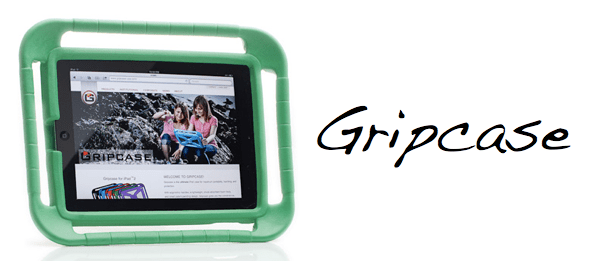
Wondering how to best protect some iPads when deploying them in a Foundation Stage of a school? That is indeed my query. These cases from Gripcase seem pretty cool as they allow you to basically drop the iPad on the floor without damage. That should do the trick!
This video explains and demonstrates it well…
iPad Smart Covers in Schools
I was wondering if anyone out there has had experience of…
- Using Apple’s ‘smart covers’ for the iPad. Any good?
- Finding a good case to use with iPads in a school setting?
- Both of the above?
Answers on a postcard. Or just in the comment box below. Either is fine. Thanks!
Toca Boca and digital toys
Over the Easter weekend I got to see my lovely niece and nephews, and as part of that was introduced to some cool iPad apps for kids. Some of these are made by the company Toca Boca, who makes ‘digital toys’ for children rather than just games.
One of their apps is Toca Hair Salon, which lets you cut and trim hair with scissors and electric trimmers, blow-dry, wash and shampoo and even hair dye or add hair restorer. It’s completely hilarious to use, particularly when it comes to using the hair drier, and is a bit like a digital version of a hairdressing mannequin head you might find in an early years role-play area. Or there is the Toca Tea Party which lets you lay out a complete tea party and then consume it, including drinking the tea (or knocking it over…all virtually of course!).
I think what I like about the apps is that they let you the child explore them in a non-linear and play-based manner, rather than prescribing the route through a game. A LEGO kit might have instructions for how to build it, but the way it ends up being played with is as open as a child’s imagination. Go have a try!
“The New iPad”
It’s always fun watching the latest Apple Special Events, even though it’s sad that there’s no Steve Jobs any more. I think I really like Tim Cook, perhaps particularly his calm and slow manner but also cheeky sense of humour.
So, iPad 3.
Or should I say, “The new iPad”. Not sure that would have gotten past Mr Jobs, especially as devices always used to be referred to as if they were a person in the room, i.e. iPad, iPhone rather than the iPad or the iPhone. But I guess they’re doing things a bit differently now.
Thoughts:
- Retina display looks amazing. People might complain that it’s just a screen, but the iPad is just screen, so it’s a pretty important part of the equation. It’s pretty funny how it’s got more pixels than a HD TV as well…
- Throwaway remark from one of the developers that the new iPad has more processing power/memory etc. than the PS3 or XBOX360. Not bad…
- The iPad is starting to be able to do thing much better than a normal ‘PC’ would, i.e. using a finger to paint on touch-up effects in iPhoto.
- The iSight camera is nice. But why iSight? Not sure why they dug that name out again, having replaced front-facing cameras with the ‘FaceTime camera’ moniker.
The thing I’m most excited about though is the reduced iPad2 price, especially with an educational discount (and no VAT) added on – the iPad starts to become very, very affordable in schools. Looking forward to finding out the ICT budget in April…
iTunes U
Very interesting post by Fraser Spiers about iTunes U. Take a look!
This could be very interesting and useful if/when we deploy some iPads in September! It seems to be able to take the concept of using the iPad for learning, rather than just learning to use an iPad. It also makes the case very strongly in my mind for having one apple ID per device; the whole iCloud ecosystem opens up for you in very useful ways.
 Primary ICT